20. Positions Test
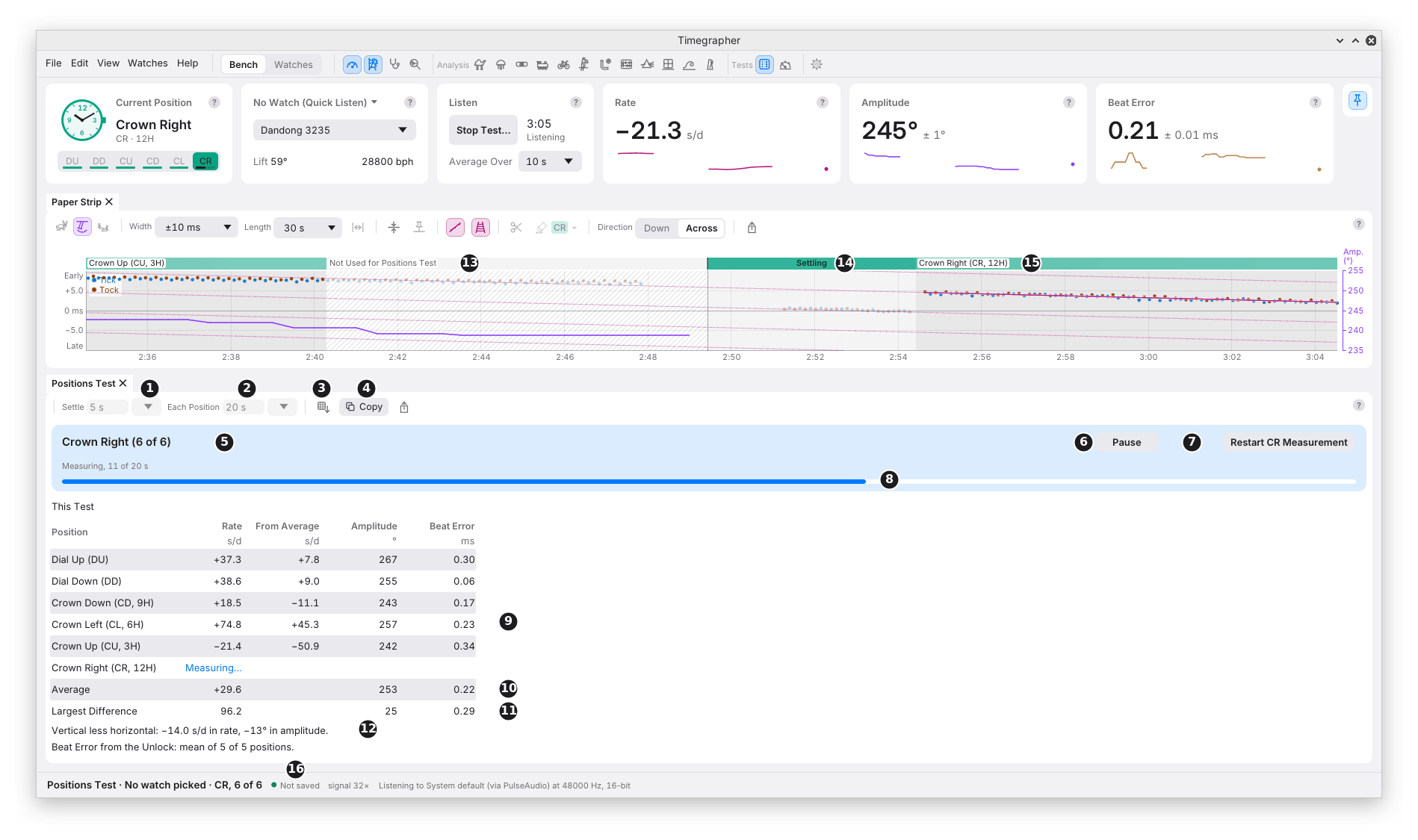
What it shows: the rate, amplitude and beat error in each of the six positions, and the figures that sum up how they differ.
Why you’d use it: a watch runs at a different rate in each position, and on the wrist it turns through all of them. A positions test shows how much the positions differ and which one stands out, which is what you need before regulating, and what you compare after a service. Run once at full wind and again 24 hours later, it also shows how the rate moves as the mainspring lets down.
The picture is a guided test with Settle set to 5 s and Each Position to 20 s, short for the picture. Each position’s sound is 2 minutes from a separate take of the same watch, a Dandong 3235 before its service, played on the stand in turn.
The Positions Test pane is a hidden tab beside the Tick Tock Profile, its icon a die showing six, under Tests in the icon bar and the View menu.
The Toolbar
| Mark | Control | What it does | Why you’d use it |
|---|---|---|---|
| New Test | Sets a test up on a clear Bench and starts nothing; Start Test on the Listen card starts it. Cancel Test takes its place until then. Sound not saved is asked about first. | To begin. | |
| Wind | For a watch picked in the Watches view: Full Wind, just after winding, or 24 Hours After, set against a full-wind test picked in Compare With. | To run the 24-hour half of the comparison (below). | |
| Load Full-Wind Results… | With no watch picked, loads the full-wind half from a file. | The same, without a watch. | |
| 1 | Settle | The seconds the watch settles after each turn before it is measured: 20 s unless set, 5 to 600 s. A field to type in, with a menu of 10, 20, 30 and 60 s. | A balance takes some seconds to steady after the watch is turned. |
| 2 | Each Position | The seconds each position is measured: 60 s unless set, 20 to 3600 s, with a menu from 30 s to 5 min. | Longer gives a smaller ± (M7). |
| 3 | Save as CSV… (comma-separated values, which any spreadsheet opens) | Saves the watch, its calibre, beat rate and lift angle, when the test began, its settling and measuring times, and the tables. | For a spreadsheet or a service record. |
| 4 | Copy | The same, on the clipboard, with tabs between the columns. | To paste elsewhere. |
| Save Results for 24 Hours… | After a test at full wind: saves its results for the test 24 hours later. Saving the session keeps them too. | To compare later. |
Settle and Each Position are kept between runs.
Running a Test
- Wind the watch and put it on the stand Dial Up, where the test begins.
- New Test, then Start Test on the Listen card. The status bar reads “Positions Test · No watch picked · DD, 2 of 6” as it goes, with the watch’s name when one is picked.
- The banner says which position it is in, and shows a bar while the watch settles and is measured.
- When it is done, the banner says which position to turn the watch to. Turn it, then press the button naming that position, such as Start CL Measurement.
- After the sixth, the test reads the six together and stops listening, as Stop does.
| Mark | Part | What it does or shows |
|---|---|---|
| 5 | The banner | The position under way and how far through: “Crown Right (6 of 6)”, “Measuring, 11 of 20 s”. |
| 6 | Pause | Holds the test, leaving out what this position measured so far. Resume settles and measures it again from the start. |
| 7 | Restart CR Measurement | Names the position under way, or the one just measured, and settles and measures it again, after a knock for instance. |
| 8 | The bar | How far through the settle or the measurement. |
Stop Test… on the Listen card ends the test early, after asking, with Keep Measuring the default; the positions measured so far keep their rows. Only the measured seconds in each position count.
The Table
| Mark | Part | What it shows |
|---|---|---|
| 9 | A position’s row | Its name with both codes (“Crown Left (CL, 6H)”), its rate, its rate less the average of the positions measured (From Average), its amplitude and its beat error (as a size). The position under way reads “Settling…”, then “Measuring…”, then its figures so far. |
| 10 | Average | The mean rate, amplitude and beat error over the positions measured: X in M8, the usual letter for it on a timegrapher. |
| 11 | Largest Difference | The highest less the lowest of each: D (for difference) for the rate. |
| 12 | Vertical less horizontal | The mean of the crown positions less the mean of dial up and dial down, for rate and amplitude: DVH (difference, vertical less horizontal). |
Lines below the table name any condition found in a position’s sound: no regular beat, clipping, under 10 s of beats, or a beat error read as a size. The table gives no verdict and no pass or fail.
In the picture, the five positions measured so far range from −21.4 s/d crown up to +74.8 s/d crown left, a largest difference of 96.2 s/d, with the amplitude 242° to 267°.
On the Strip
From the moment the test starts, the strip, its track and the charts mark each phase in its own grey:
| Mark | Part | What it shows |
|---|---|---|
| 13 | Not Used for Positions Test | Hatched: the time while the watch is turned, a measurement given up for a restart or a pause, the pause itself, and a position cut short by Stop Test. |
| 14 | Settling | A light shade over each settle. |
| 15 | A position’s stretch | The darkest shade, named by the position: the seconds that count. |
| 16 | The status bar | The test and the position under way: “Positions Test · No watch picked · CR, 6 of 6”. |
The sound before the test began is left plain under Before Test, with a line where the test begins. Beats outside the measured stretches are drawn faintly. The marks stay until a new test or a new session, and a saved session keeps them.
A Table for Every Take
With no guided test, the pane shows a table for the take on show or under way, filling in as you press the Current Position card. So a free take, in which you mark each position as you turn the watch, becomes a partial or full positions test. Duration is the time marked in each position, less the Settle at the start of each stretch and any masked time. A position needs 10 s before it shows figures (“Under 10 s”), and one never marked reads “Not marked”. The Average and Largest Difference rows follow once two positions have figures.
Full Wind against 24 Hours
- Run a test just after winding, then Save Results for 24 Hours….
- Leave the watch unwound and off the wrist for 24 hours.
- Pick that test in Compare With (it lists the watch’s full-wind tests from 12 to 36 hours ago), or load it with From a File… or Load Full-Wind Results…. The pane shows it as a Full Wind table.
- Start Test runs the six again. The banner names the hours since the full-wind test began.
The pane adds a Full Wind Against N Hours table, such as “Full Wind Against 24.1 Hours”: each position’s rate and amplitude at full wind and now, and the change; the largest change in rate with crown right left out (Im); and the size of the change in the mean rate (Ie). M8 gives how each is worked out.
What to Look For
| What you see | What it can mean |
|---|---|
| A small Largest Difference | The rate barely depends on position. |
| One vertical position far from the rest | It can point to the balance’s poise. |
| A large vertical less horizontal | The pivots and jewels, which rest on their sides in the vertical positions and their ends in the horizontal. |
| The amplitude much lower in the vertical positions | Usual to a degree; how much is for you to judge. |
| A large Im or Ie | The rate moves as the mainspring lets down: isochronism (chapter 19, M12). |
What It Can’t Tell You
- Whether the watch passes. There is no tolerance or verdict; compare with the maker’s or the standard’s figures yourself.
- The cause. A difference between positions says the rate depends on position, not why.
- More than the seconds measured. Each position is one short reading, with its own ±.
Previous: Isochronism · Next: Power Reserve Test
This page comes from the app's user guide at v1.0.1. See it on GitHub.