21. Power Reserve Test
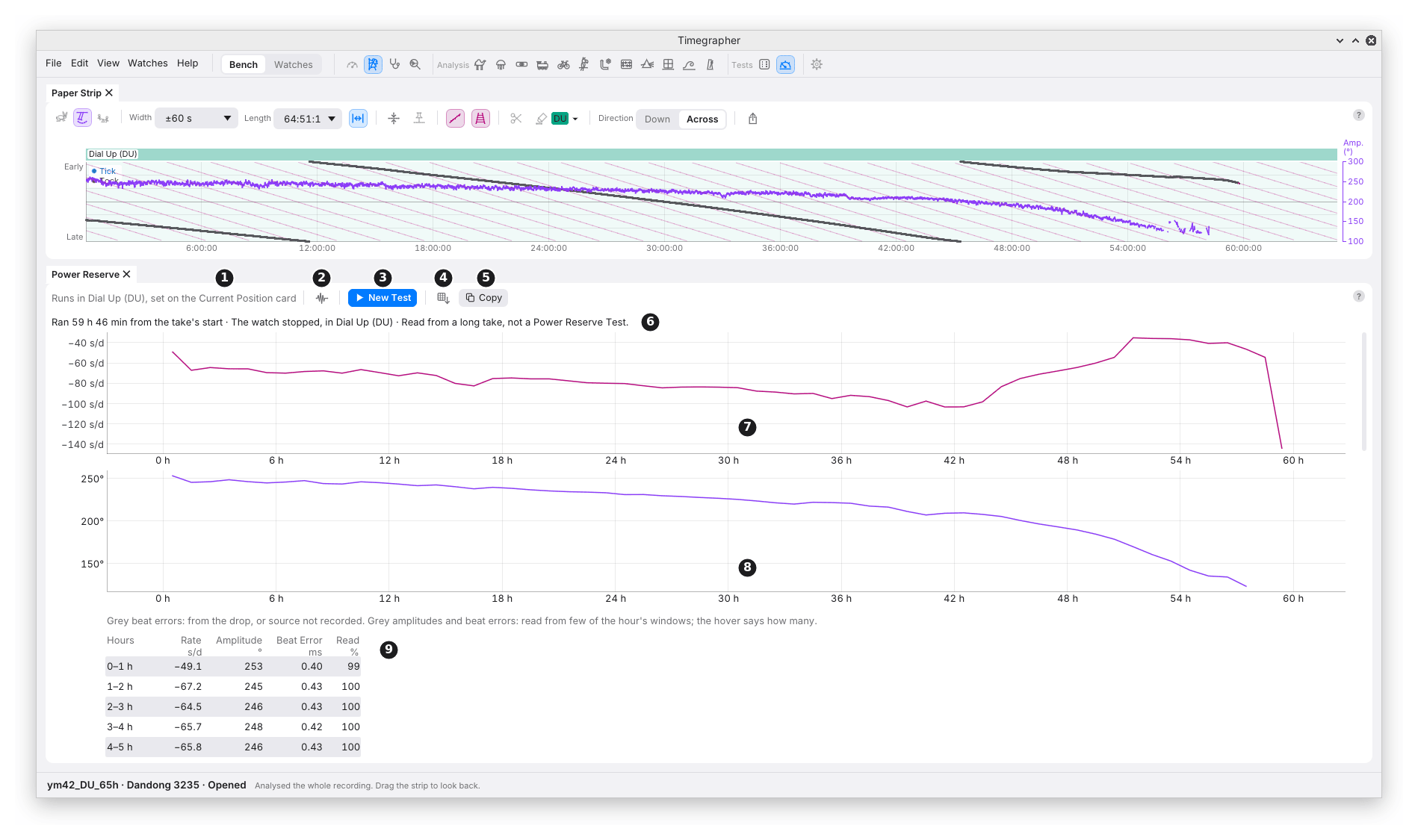
What it shows: how long the watch runs from full wind until it stops, in one position, and how its rate, amplitude and beat error change hour by hour on the way.
Why you’d use it: the power reserve is how long a full wind lasts. A watch that stops well short of its calibre’s figure, or whose amplitude falls away early, can point to the mainspring, its lubrication or the barrel. The hour table also shows how the rate moves as the mainspring lets down, the same thing Isochronism (chapter 19) reads by amplitude.
The Power Reserve pane is a hidden tab beside the Positions Test, its icon a fuel gauge near empty, under Tests in the icon bar and the View menu.
The Toolbar
| Mark | Control | What it does | Why you’d use it |
|---|---|---|---|
| 1 | The position | “Runs in Dial Up (DU), set on the Current Position card”. The test runs in the position on that card; the pane has no position setting of its own. | Set the position on the card before you start. |
| 2 | Keep Sound or Analysis Only | Keep Sound keeps the run’s sound in the take. Analysis Only keeps its analysis alone, and deletes the sound, as Keep Analysis Only does (chapter 23). | A run of 40 hours or more is a large file. The pane’s hover before a test gives the space free against the most an 80-hour run writes: 0.35 GB (gigabytes) an hour at 48 kHz, 16-bit. |
| 3 | New Test | Sets the test up on a clear Bench and starts nothing. Cancel Test then takes its place. | To start a run. |
| 4 | Save as CSV… | Saves the watch, the run and the hour table, with a “Beat error from” column. | For a spreadsheet or a service record. |
| 5 | Copy | The same, on the clipboard, with tabs between the columns. | To paste into a note or a message. |
Running a Test
- Wind the watch fully and set its position on the Current Position card.
- New Test, then Start Test on the Listen card. A new session starts in that position.
- Leave it. While the test runs, the computer is kept awake, whatever Keep Awake is set to, and the position can’t change. The pane shows the run time from the first beat heard, how the beats stand, and the stops on the way, with the hours so far.
- The test ends by itself when the watch stops. Stop Test… on the Listen card ends it early, after asking, with Keep Measuring the default.
When the watch has stopped: the run ends at the last beat heard before 10 minutes with none. A beat counts when it matches the watch’s sound with a quality over 0.4, in a run of at least eight such beats each within one and a half beats of the last, so a lone click is not the watch. Beats that come back sooner join the run, and each silence of 30 s or more inside it is counted as a stop on the way. A run still going at 80 hours ends there.
The take is kept in the watch’s history, named by its local start time and “Power Reserve”. The Watches view lists it as “Power Reserve 46 h 12 min”, adding how it ended when the watch didn’t stop it: “Stopped by hand while the watch still ran”, or “Reached the 80 h limit while the watch still ran”. If the recording itself fails, for example on a full disk, the run ends there and reads “at least”: “Power Reserve at least 2 h 01 min · The recording failed while the watch still ran”. Its hours so far are kept in the take, and the take keeps its sound even with Analysis Only picked.
The Results
| Mark | Part | What it shows |
|---|---|---|
| 6 | The result line | The run time in true time (through the sound card’s measured clock), how it ended, and the position: “Ran 41 h 12 min · The watch stopped, in Dial Up (DU)”. |
| 7 | The rate | The rate against hours since the first beat: a line through the middle of each hour, an ended run’s last part hour included. |
| 8 | The amplitude | The amplitude against the same hours. |
| 9 | The hour table | Each hour: its rate (s/d), median amplitude (°), beat error (ms) from the unlock, and how much of the hour its whole 10 s readings cover (Read %). The last hour is as long as is left. |
Grey in the table marks a figure that stands on less than the rest, and the key over the table says so. A beat error from the drop, where the unlock isn’t found, or whose source wasn’t recorded, is grey, and its hover names its source. An amplitude or beat error read from under 60% of the hour’s 2 s windows is grey too, and its hover says how many (“read from 459 of 1798 windows”). An amplitude read from under a tenth of them isn’t given at all: the cell shows a dash, and the amplitude chart stops before that hour. A few windows are too few to stand for an hour; the figure they give can be far from the truth. Scrolled down, the table’s titles stay at the top.
While a test runs, about once a minute the hour in progress is measured again, and it shows as a finished run’s last would: a part hour labelled “2–2.4 h”, its hover giving the exact time, “A part hour: 26:28 past 2 h”. The charts start from the first whole hour.
From a Long Take
A take opened whole that isn’t a Power Reserve Test, in one position, with six hours or more from its first beat to its last, fills the pane the same way, as in the picture. Its wind at the start isn’t known, so its run is never called a power reserve: the line reads “Ran 59 h 46 min from the take’s start” (“Ran at least …” when the watch was still running at the take’s end) and “Read from a long take, not a Power Reserve Test”. Nothing is written into the take.
In the picture is a Dandong 3235, fully wound, left dial up on the stand and recorded until it stopped: “Ran 59 h 46 min from the take’s start · The watch stopped”. The Paper Strip above it shows the whole take, the amplitude line falling to the right and the beats ending before the take does. Hour by hour, the amplitude falls from 253° in the first hour to about 210° at 42 hours, then faster, to 124° in the 57–58 h hour: the steady fall and the late drop of a mainspring letting down. The amplitude chart stops there; the table’s last hours, below, say why. The rate is −49 s/d in the first hour, near −65 s/d from then to 12 hours, about −100 s/d at 42 hours, then climbs to about −40 s/d from 52 to 57 hours, and falls to −140 s/d in the last part hour. So this watch’s rate moves by 60 s/d over its reserve: what it keeps on the wrist depends on how far down it is allowed to run.
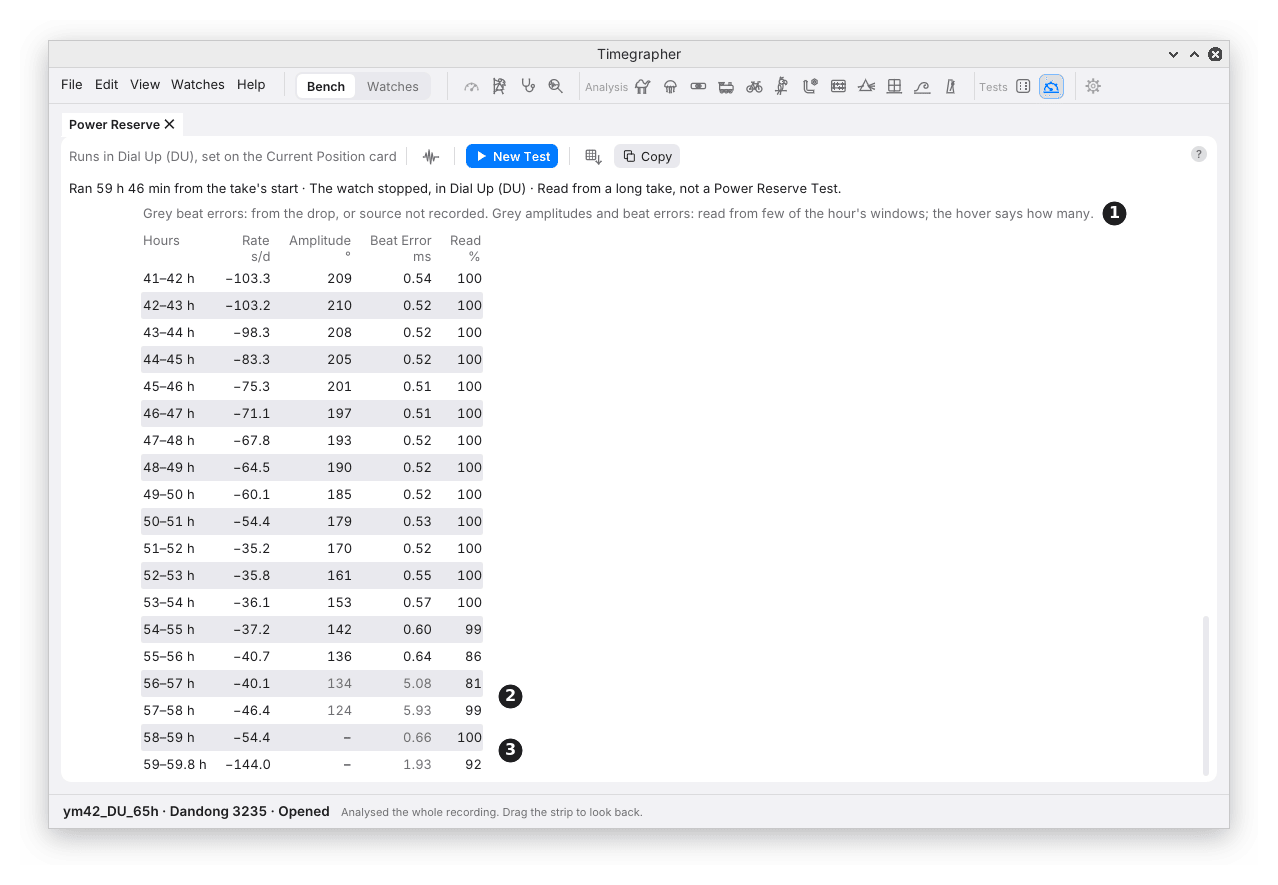
| Mark | Part | What it shows |
|---|---|---|
| 1 | The key | What grey means in each column. |
| 2 | A grey amplitude and beat error | Read from under 60% of the hour’s windows; the hover gives the count. |
| 3 | A dash | An amplitude withheld: under a tenth of the hour’s windows gave one. The beat error beside it is from the drop, so grey. |
Scrolled to its end, the same table shows the watch’s last hours. From 56 hours the beats grow faint, and the unlock that the amplitude is timed from is found in fewer of the hour’s windows: 134° and 124° are grey, and so are the beat errors of 5.08 and 5.93 ms beside them, each read from under 60% of the hour’s windows. Ten times the 0.4 to 0.6 ms of the hours before, they are the faint unlock found on noise, not the watch. In the last two hours it is found in too few to give a figure, and the cells show a dash. The rate, timed from the whole beat, is still read: −54.4 s/d, then −144.0 s/d in the last part hour as the watch stops. Without the floor, those few windows gave an amplitude near 290° for the last hour, a rise that never happened.
What to Look For
| What you see | What it can mean |
|---|---|
| A run well short of the calibre’s power reserve | The mainspring, its lubrication, the barrel, or a wind that wasn’t full. |
| The amplitude falling steadily, then faster near the end | The mainspring letting down; the last hours have the least power. |
| The rate moving as the amplitude falls | The watch’s isochronism (chapter 19). |
| Stops on the way | Silences of 30 s or more: the watch stopping and starting, or the sound lost. |
| A low Read % in an hour | Little of that hour could be read: noise, or a weak sound late in the run. |
What It Can’t Tell You
- The cause of a short reserve. The run time and the amplitude say how it ran down, not why.
- The calibre’s rated reserve. Compare with the maker’s figure; the app gives what this watch did.
- Other positions. A test runs in one position. A Positions Test (chapter 20) compares positions.
- A wind it didn’t see. A run from a long take starts wherever the take started, not at full wind.
Previous: Positions Test · Next: The Watches View
This page comes from the app's user guide at v1.0.1. See it on GitHub.